
How to Give Your Agent Eyes and Hands
An Assistant That Talks But Doesn’t Do
Have you ever been in this situation: you ask an AI a question, it gives you a perfect answer, but you have to execute every single step yourself.
“Fix this bug for me.”
It tells you: open this file, find line 42, change foo to bar, then run npm test to verify.
Sounds great. But it doesn’t lift a finger.
It’s like hiring a consultant who sits next to you pointing at the screen but never touches the keyboard. You open the editor, find the line, make the change, run the test, check the result, then report back: “Done, but the test still fails.” Then it gives you the next suggestion.
After a few rounds of this, you start thinking: can’t you just do it yourself?
That’s why Agents need “eyes” and “hands” — not just language ability, but the ability to perceive the world and change it.
Eyes: Letting Agents See the World
An Agent without perception is like a blindfolded person. You have to constantly narrate the surroundings for it to give advice. Extremely inefficient, and the information you describe is always lossy.
The Browser Is the Agent’s Eyes
In my recent practice, I connected an Agent to a browser tool. What can it do?
- Open web pages: Visit URLs directly, see page content
- Get snapshots: Obtain the page’s accessibility tree — a structured description far more AI-friendly than screenshots
- Take screenshots: When visual judgment is needed, capture the screen directly
- Execute JavaScript: Run code in the page context to get DOM info or trigger actions
The most critical one here is Snapshot.
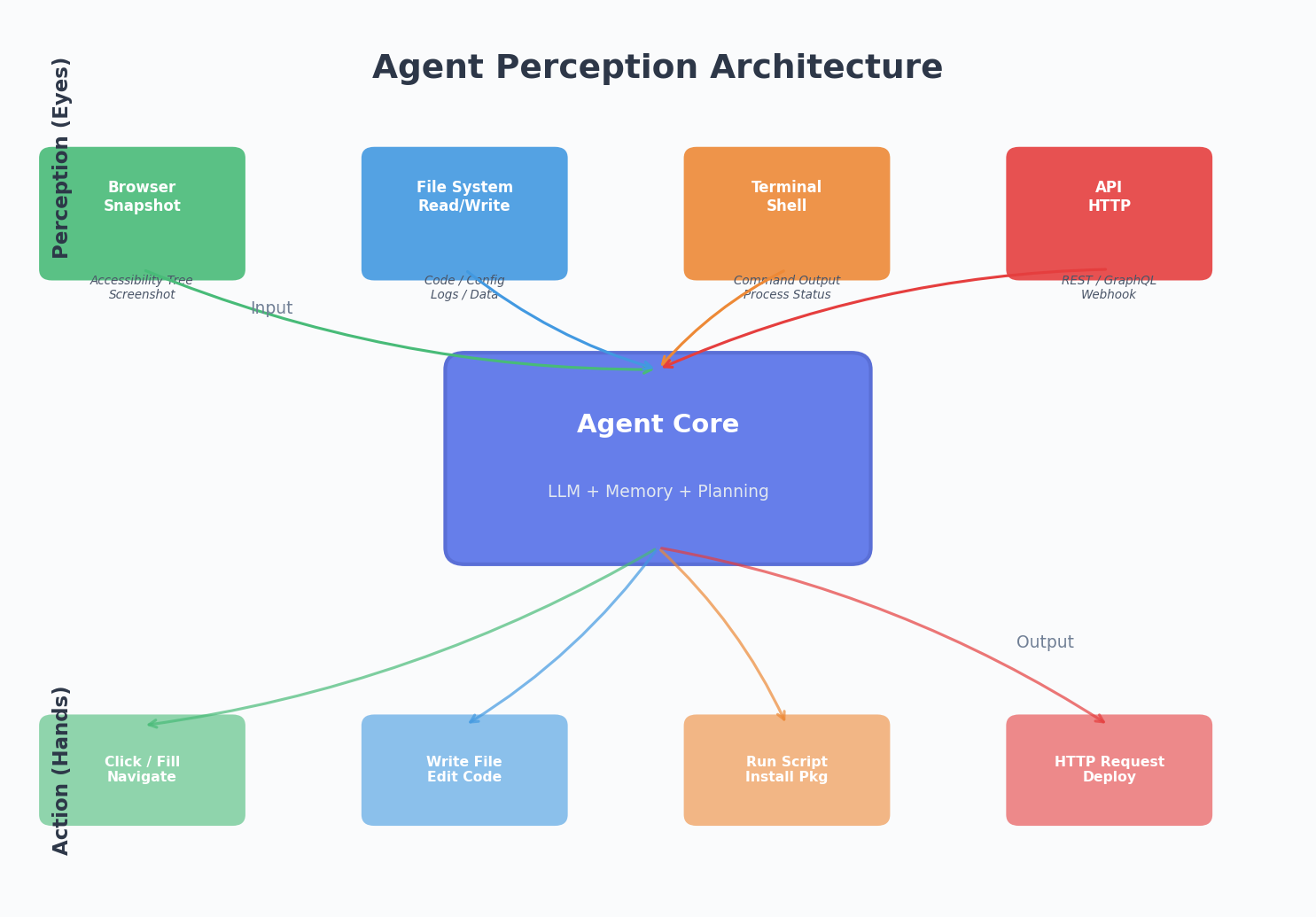
Many people’s first instinct is to give the Agent a screenshot and let a multimodal model “see” the image. That works, but it’s inefficient — a single screenshot might consume thousands of tokens, and the model’s accuracy at extracting structured information from images is far lower than reading structured data directly.
The accessibility tree is maintained by the browser for accessibility features. It describes every interactive element’s role, name, and state. For an Agent, this is a “semantic map” — it doesn’t need to know what color a button is or where it sits on screen. It just needs to know “there’s a button called ‘Submit’ with ref e42.”
Snapshots are AI-friendly. Screenshots are human-friendly. Give Agents snapshots, show humans screenshots.
Beyond the Browser
Eyes aren’t just browsers. An Agent’s perception can extend across many dimensions:
- File system: Read code files, config files, log files
- Terminal output: See stdout and stderr after executing commands
- API responses: Parse return data after calling interfaces
- Git status: Know the current branch, uncommitted changes, recent commits
Each perception channel tells the Agent: what the world looks like right now.
Hands: Letting Agents Change the World
Seeing isn’t enough. They need to act.
Script Execution Is the Most Universal “Hand”
If I could give an Agent only one action capability, I’d choose shell script execution.
Why? Because shell is the universal glue. You can use it to:
- Create, modify, delete files
- Install dependencies, run builds, execute tests
- Call APIs, download resources, process data
- Manage Git, deploy code, handle processes
An Agent that can execute shell scripts can theoretically do anything a programmer can do.
But Coarse-Grained Isn’t Enough
Pure shell has a problem: it’s too low-level. Having an Agent use sed for text replacement often goes wrong due to escape characters and regex edge cases.
So the better approach is to provide multi-layered action capabilities:
| Layer | Tool | Use Case |
|---|---|---|
| Fine-grained | File read/write, search & replace | Modify code, update configs |
| Medium | Browser interaction (click, fill, navigate) | Web operations, visual verification |
| Coarse-grained | Shell scripts | Build, deploy, system admin |
Fine-grained operations reduce error rates. Coarse-grained operations ensure flexibility. Combined, the Agent can be both stable and fast.
A Real Example
When I had an Agent help me build this blog, its “hands” collaborated like this:
- Write files (fine-grained): Create Markdown articles, modify config files
- Execute scripts (coarse-grained):
hexo generateto build,git pushto deploy - Browser operations (medium): Open the deployed page, check rendering
- Search & replace (fine-grained): Found a CSS issue, precisely modified the stylesheet
The entire workflow ran on its own. I just refreshed the page at the end to see the result.
Eye-Hand Coordination: The Perception-Decision-Action Loop
Eyes and hands alone are meaningless. The key is forming a closed loop.
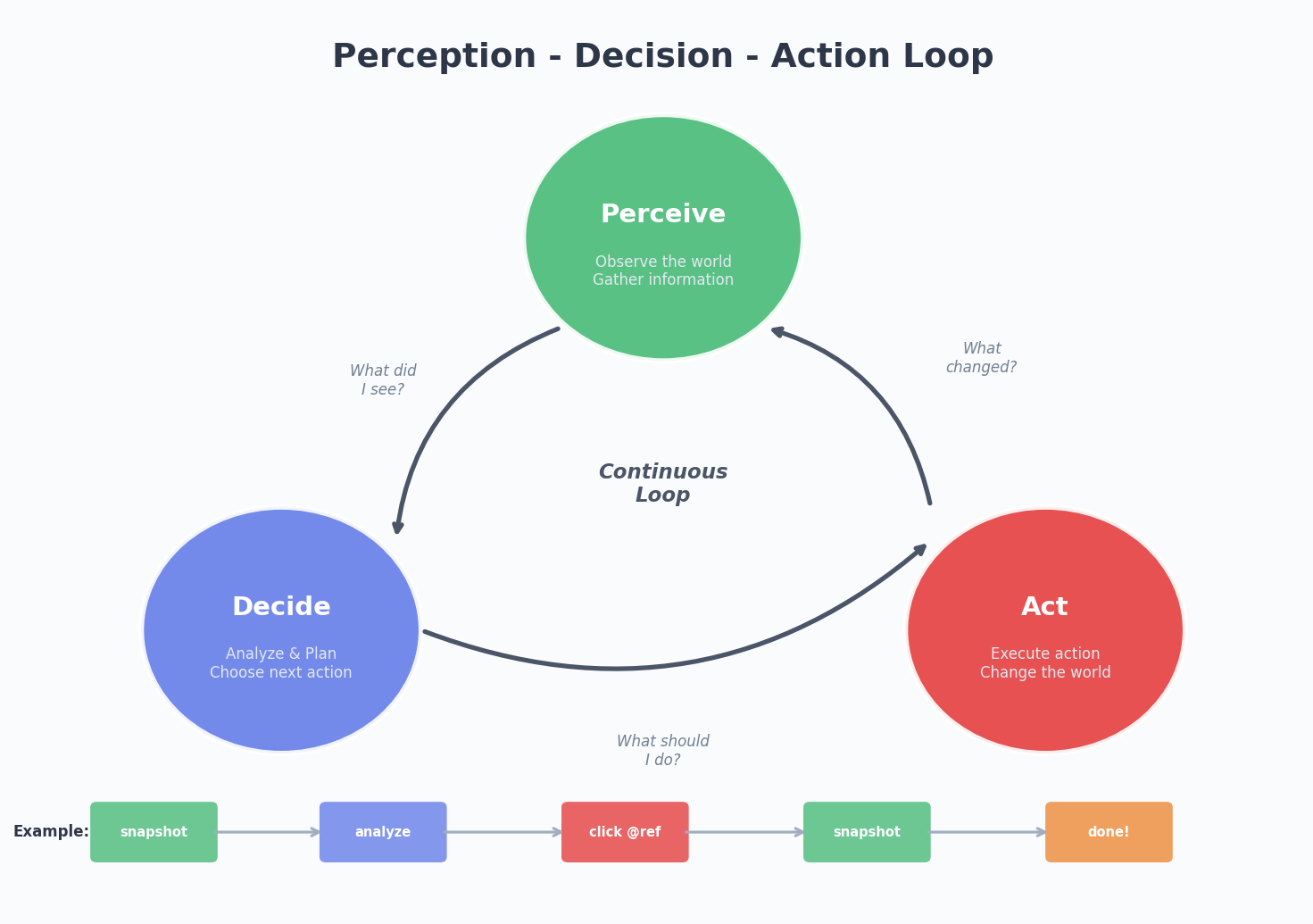
1 | Perceive (what do I see?) → Decide (what should I do?) → Act (do it) → Perceive (did the world change?) → ... |
This loop sounds simple, but implementation has many nuances:
1. Always Verify After Acting
After an Agent executes an operation, it can’t just assume success. It needs to look back:
- Changed code? Run the tests.
- Deployed a website? Open the browser and check.
- Installed dependencies? Verify
node_modulesexists.
Unverified actions are dangerous. It’s like crossing the street with your eyes closed — you took the step, but you don’t know if there’s a car coming.
2. Errors Are Information, Not Dead Ends
When an Agent’s script throws an error, the error message itself is the most valuable perception input. A good Agent will:
- Read the error message
- Analyze the cause
- Adjust the approach
- Re-execute
Rather than just telling you “execution failed, please handle manually.”
3. Know When to Stop
The loop can’t spin forever. The Agent needs to judge:
- Is the task complete?
- Am I stuck in an infinite loop?
- Should I ask the user for confirmation?
This is a kind of metacognition — not just doing things, but knowing what you’re doing and how well you’re doing it.
Current Limitations
Having talked about the benefits, let’s discuss the real-world pitfalls.
Blurry Security Boundaries
An Agent that can execute shell scripts can theoretically rm -rf /. While no sane Agent would do this, permission control is a problem that must be taken seriously.
Current approaches typically include:
- Restricting the working directory
- Blocking dangerous commands
- Requiring human confirmation for critical operations
But these are all patches. A more fundamental solution might be sandboxed execution environments — the Agent operates in an isolated container, so even mistakes don’t affect the host system.
Limited Perception Bandwidth
Even with browsers and file systems, an Agent’s perception bandwidth is still far below a human’s. A human can instantly see “this page layout is wrong.” An Agent needs to parse the entire DOM tree to reach a similar conclusion.
Multimodal models are improving, but they’re not at the “glance and understand” level yet. The current best practice is combining structured perception (snapshots) with visual perception (screenshots).
Context Loss in Long Tasks
A complex task might require dozens of steps. As steps accumulate, early perception information gets pushed out of the context window. The Agent might forget what it saw three steps ago.
This circles back to memory management — what the eyes see also needs to be remembered.
The Future: Richer Perception and More Precise Action
I believe Agent eyes and hands will evolve along several directions:
Perception Side
- Real-time visual understanding: Not just screenshots, but “seeing” the screen like a human — understanding layout, color, animation
- Multi-source information fusion: Simultaneously processing code, logs, browser, database, and other information sources
- Active exploration: Not waiting to be told where to look, but proactively browsing files, checking logs, searching docs
Action Side
- Finer operations: Operating an IDE like a human — refactoring code, running debuggers, setting breakpoints
- Cross-system orchestration: Simultaneously operating multiple services, environments, and toolchains
- Physical world interaction: Extending from the digital world to the physical world through IoT devices and robot interfaces
Coordination Side
- Adaptive strategies: Automatically choosing perception precision and action granularity based on task complexity
- Parallel operations: Executing multiple subtasks simultaneously instead of waiting serially
- Collaboration: Multiple Agents dividing work — one handles frontend, one handles backend, one handles testing
Final Thoughts
Back to the original question: how do you give an Agent its own eyes and hands?
Technically, the answer is connecting it to browsers, file systems, terminals, APIs, and other tools. But the deeper answer is: let it form a perception-decision-action loop, and continuously learn and improve within that loop.
An Agent that can only talk is a consultant. An Agent that can see and do is a colleague. An Agent that can see, do, and learn from mistakes is a true partner.
We’re moving from the “consultant era” to the “colleague era.” The road is long, but every step is exciting.
The building, deployment, and debugging of this article was entirely done by an Agent with eyes and hands. It saw the page go white, investigated the cause on its own, fixed the config, and redeployed. That’s the power of eyes and hands.
If you’re also exploring the boundaries of Agent capabilities, find me on Twitter.
 微信
微信- 支付宝